


JSAUX has been making Switch 2 accessories for a while, and we’ve covered several of them. The VOIDJOY SkyLark S1 Pro is its take on the pocket-size controller. For $49.99, it’s a portable gamepad for people who play on more than one device: a smartphone, a tablet, a PC, a handheld, or a Switch.
I’ve had it for the last couple of weeks, and it surprised me in a good way. On paper there’s a long list: TMR sticks, optical triggers with two travel settings, three connection methods, a companion app, macros, and more. It feels like a full controller in the hand. It’s not without its faults, and you’ll see why. Let’s look at what JSAUX says it comes with, what I found in daily use, and who should buy it.
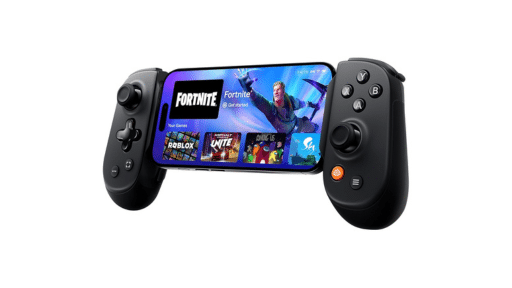

Pocket Size, Full Ambitions
JSAUX lists the S1 Pro at 113 g and 133 x 75 x 24 mm with the triggers retracted. Those numbers match the idea behind it: this is meant to go into a pocket or a backpack without a second thought. The materials are good quality for the price, and it does not feel like a toy or throwaway accessory.
The sticks are the highlight. JSAUX uses submerged TMR sticks, which deliver a finer and more stable signal than standard Hall sensing, with a 1000 Hz polling rate in wired and 2.4 G modes. TMR sensors are often marketed as drift resistant, and I am always glad to see them. Having faced drift issues with many Joy-Cons, anti-drift sticks are always a blessing. The recess is meant to prevent accidental presses when the controller sits in a bag. It kind of reminds me of the submerged sticks from my RG34XX SP!

The triggers are a nice extra. JSAUX calls them “optical linear” triggers with a switch for two travel lengths: about 4 mm of travel for analog control in racing games or about 2 mm for faster input in shooters and action games. A lock switch next to the triggers changes between the two modes. Which setting you prefer depends on the game. Since I am a big RPG player, I usually have it set to 2 mm. The controller also has pressure-sensitive ABXY buttons, 6-axis motion, dual rumble, and two programmable buttons (ML and MR).
My main complaint is the D-pad. It feels a little mushy, and the whole pad can be pressed all the way in from the center, so I am not sure it would register very fast movements reliably. That could be very negative in fighting games and precise platformers. The triggers also lack a sense of “click” when fully pressed, and some users may find them too mushy as well.

Connect Anywhere
Connecting is easy, and this is where the S1 Pro impressed me most. The 2.4G dongle is the simplest route: plug in the included USB-A receiver, set the mode switch to 2.4 GHz, and turn the controller on, and it connects by itself. The only catch is the dongle itself. It’s tiny and very easy to lose, so keep it somewhere safe!
Bluetooth is just as simple. JSAUX’s guide lists four Bluetooth modes. X mode connects as an Xbox-style controller (XInput) to PC, Android, and iOS devices. D mode connects as a generic DInput controller. S mode connects as a Pro Controller to Switch, Switch Lite, and Switch 2. T mode is the one I was not sure about… According to JSAUX, it connects to Android devices in touchscreen mapping mode, also called virtual touch mode. In other words, the controller can act like on-screen touch controls for games that do not support gamepads natively. Sounds great and useful for many mobile games that don’t have proper gamepad support, but I have not tested that mode myself.

Having two Bluetooth slots is very handy. A switch at the bottom left of the controller toggles between D1 and D2, so one can be connected to your PC and the other a phone or tablet. JSAUX quotes up to 8 devices stored across 12 connection setups. There is also a USB-C wired mode, which the company recommends for low-interference play and higher polling rates.
Switch 2 owners get a real bonus. Once paired correctly, the S1 Pro can wake the console, which some older controllers cannot do. Per JSAUX’s guide, wake setup works only on Bluetooth channel D1 and not through the dongle or USB. So make sure it’s set to D1 and S mode for full Switch compatibility. I wish, however, that the AB and XY could be swapped on the fly with a button combination. Perhaps that’s something that JSAUX can work out via an update.
A Deep App With A Steep Learning Curve
JSAUX’s companion app is called KeyLinker. According to the company, it handles button mapping, turbo, macros, dead zones, sensitivity, and trigger settings and lets you save and share setups. The controller also has built-in shortcuts: Fn plus another button starts turbo (with three speed levels), and Fn plus ML or MR records a macro.
The app is quite packed with features, particularly when the advanced options are enabled since almost every option can be adjusted. The drawback, however, is the way the app is navigated. It’s a tedious process, and some users will find many functions difficult to understand. I wouldn’t give this app to a beginner and expect them to work out how to use it within five minutes.

My advice is simple: before you do anything else, read the operation guide and watch the video tutorial on its website. It covers pairing, trigger switching, Switch 2 setup, turbo, and macros, and it saves a lot of frustration. The same goes for the shortcuts. There are many of them, and memorizing every function takes time.
JSAUX also advertises a two-player role swap. If two S1 Pro controllers share one 2.4G receiver, either player can press Fn plus the 1P/2P button to swap player assignments in local co-op games without pausing or re-pairing. The company says it’s meant for games like It Takes Two or Overcooked, and that it does not work over Bluetooth. I did not test it, since it needs two controllers.
Battery life is listed at about 10 hours from a 1000 mAh battery, with a roughly 3-hour USB-C charge. Just make sure to turn off the controller with the bottom switch, and it’ll last quite a while.

A Versatile Pocket Gamepad That Earns Its $50
The VOIDJOY SkyLark S1 Pro is a very complete portable controller for $49.99. It’s easy to connect, its sticks and triggers are better than you might expect at this size, and the Bluetooth slots make it simple to hop between PC, phone, tablet, and a Switch. For Switch 2 owners like me, wake support is a genuine win.
It’s not flawless, however. The D-pad is a little lackluster, and the app and shortcut system ask for patience. If you read the manual and watch the video first, most of that frustration goes away. I would still like the app to be easier to navigate.
Who is it for? I think it’s a solid recommendation for people who play on several devices, especially handheld players, who want one versatile controller that fits in a pocket or a backpack. If you mostly play fighting games and care a lot about the D-pad, try before you buy if you can. If you want a single controller that follows you from the desk to the sofa to travels, it’s easy to like.
All in all, it’s a well-built, flexible pad with a lot of depth. It has quirks, but at this price it’s hard to ignore.
As always, remember to follow us on our social media platforms (e.g., Threads, X (Twitter), Bluesky, YouTube, and Facebook) to stay up-to-date with the latest news. This website contains affiliate links. We may receive a commission when you click on these links and make a purchase, at no extra cost to you. We are an independent site, and the opinions expressed here are our own.