Xbox Cloud Gaming might soon give you more control over how you stream. The Better xCloud community recently discovered new resolution options and subscription-related text being tested inside Microsoft’s web client. These changes aren’t live for the public yet.
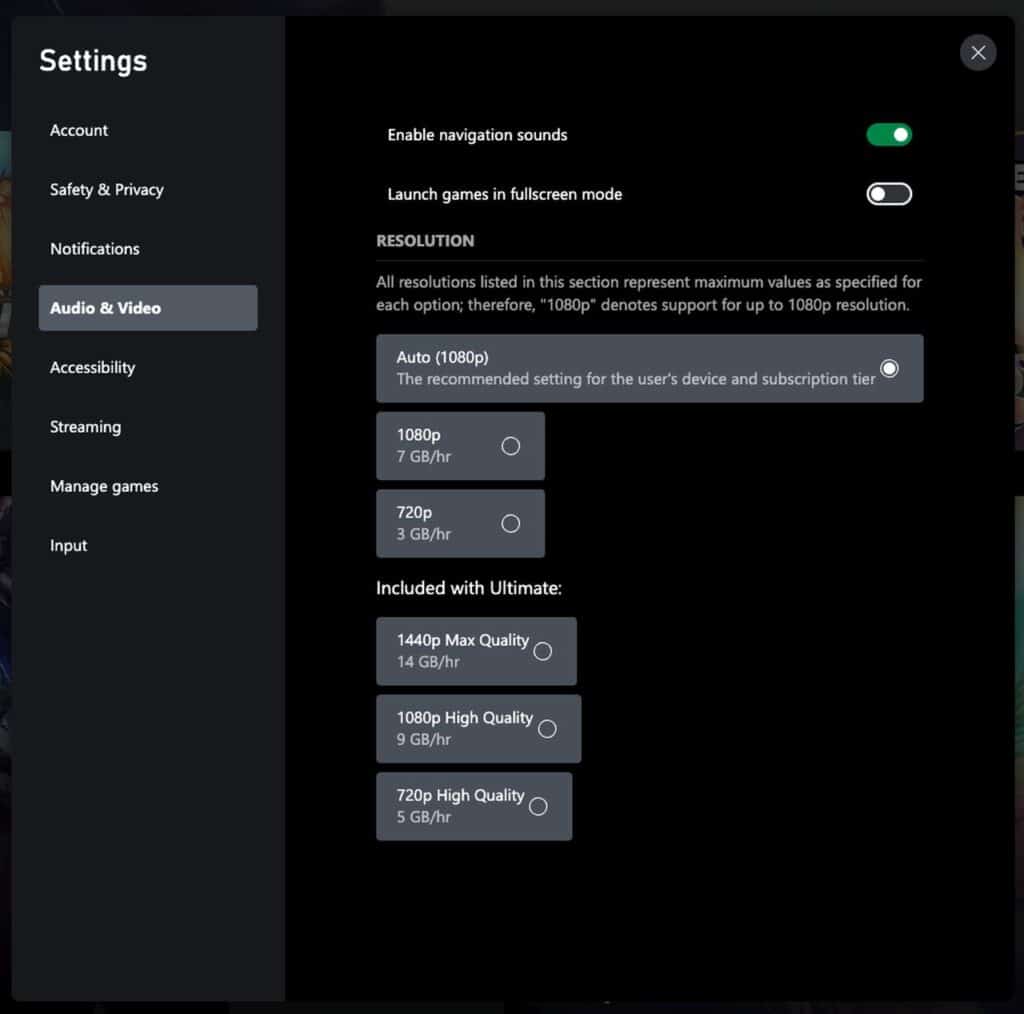
The new “Resolution” section lists Auto, 720p, 1080p, and 1440p Max Quality options, though they currently appear only in test builds. It’s the clearest sign yet that Microsoft may soon let users manually choose their stream quality instead of relying on automatic detection.

Also tucked in the update are lines mentioning a “monthly limit” and a message prompting users to “upgrade to keep playing.” Combined with new “Included with Ultimate” tags, it looks like Xbox Cloud Gaming could be preparing for a tiered or limited-access model in future updates.
Better xCloud stresses that these findings come from backend code and testing builds, not the public version of Xbox Cloud Gaming. Still, the discovery hints at ongoing experiments designed to improve flexibility, accessibility, and how different subscription tiers deliver cloud gaming performance.
Xbox Cloud Gaming Resolution Options and Quality Notes
The test build adds something Xbox Cloud Gaming users have asked about for years: a manual resolution selector. While 1440p streaming has already rolled out for Game Pass Ultimate subscribers, the current public build still picks resolution automatically based on connection quality.
In this new version, users can manually choose between Auto, 720p, 1080p, or 1440p Max Quality. Better xCloud’s screenshots show that each setting lists a data usage estimate per hour, similar to what video streaming platforms display.
Not everyone can see this menu yet. It’s still limited to internal testing. The new disclaimer, “Quality may vary per region, network capabilities, and service demand,” also suggests that some areas may temporarily lose access to higher resolutions depending on server load.
For now, these options don’t affect live streams on the public site, but they’re a strong indication that Microsoft plans to give users more control over performance and data use.
Hints of a Free Xbox Cloud Gaming Tier
The backend update also includes new text strings that suggest a free or limited-access version of Xbox Cloud Gaming could be in testing. Lines such as “Come back next month or upgrade to keep playing” and “Monthly limit reached” were discovered alongside the new resolution menu.
Better xCloud noted that these phrases appear in the service’s localization files, not in any visible public interface. That means the feature isn’t live yet, but it’s likely being prepared for upcoming subscription changes. The wording closely matches what you’d see on platforms with timed or usage-limited free tiers, such as GeForce NOW’s one-hour sessions.
If implemented, it would mark the first time Xbox Cloud Gaming offers access without an active Game Pass subscription. It could also serve as a preview system, letting new users try the service before subscribing to one of the paid tiers.
Microsoft hasn’t officially announced anything yet. Though, the inclusion of this new text points toward a clear experiment: making cloud gaming more open and flexible across Game Pass tiers, possibly with a free entry point.

Small Changes That Could Mean a Lot for Xbox Cloud Gaming
These updates aren’t public yet, but they could reshape how Xbox Cloud Gaming works. The new resolution selector finally gives users control over stream quality instead of leaving it to automatic detection. The hidden text about monthly limits hints at something even bigger, possibly a free or time-limited tier that lets more people try cloud gaming.
Right now, everything is still in testing. Microsoft hasn’t said when these changes might roll out, and the options could stay internal for a while. Even so, it’s clear the company is preparing to make its cloud platform more flexible and better aligned with the new Game Pass tiers.
Better xCloud often spots changes long before they go live, so this discovery is worth watching. We’ll be keeping an eye on whether the resolution selector or new messages appear in the public version.
Have you seen the new menu or text on your end? Share your experience in the comments.
As always, remember to follow us on our social media platforms (e.g., Threads, X (Twitter), Bluesky, YouTube, and Facebook) to stay up-to-date with the latest news. This website contains affiliate links. We may receive a commission when you click on these links and make a purchase, at no extra cost to you. We are an independent site, and the opinions expressed here are our own.