The recent overhaul of Xbox Game Pass, which saw the top-tier Game Pass Ultimate subscription jump in price, brought with it a significant new perk: the inclusion of Ubisoft+ Classics.
This move immediately expanded the Game Pass library with a selection of classic Ubisoft titles. For example, several games from the Assassin’s Creed, Far Cry, and Tom Clancy’s franchises. As stated by Xbox, these games are accessible via Xbox Cloud Gaming. This means Ultimate subscribers can stream them on consoles, mobile devices, and PC via the browser.
But here is the niche, incredibly useful detail that many might miss: because your Game Pass Ultimate subscription effectively grants you the Ubisoft+ Classics license on PC through your linked Xbox and Ubisoft Connect accounts, you can also access these games on NVIDIA GeForce NOW.
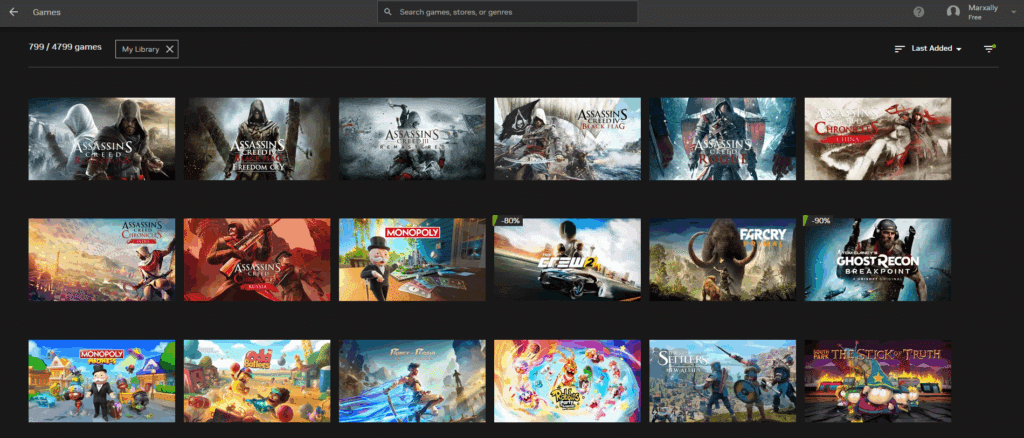
Why This Matters for Cloud Gamers
For those who rely on cloud gaming, this is a huge bonus. It effectively gives you two different ways to stream the same Ubisoft titles without paying for an extra service.
Xbox Cloud Gaming is great for convenience, especially if you are on an Xbox console or a mobile device. It’s getting significant quality improvements with the Ultimate tier. Keep in mind, however, that the streamed versions are often the Xbox Series S editions.
GeForce NOW, however, offers a different approach. It focuses on streaming the PC version of a game with the power of high-end NVIDIA graphics cards. This frequently means higher resolutions, better graphics settings, and more stable performance, even with the free plan.
In short, if you are a Game Pass Ultimate subscriber and an Ubisoft game is available on both xCloud and GFN, you now have the choice to stream it on either service. You can pick the one that best suits your current device and quality preference. Keep in mind Xbox achievements, if you care!

How to Make the Connection
The process depends on the mandatory linking between your Microsoft and Ubisoft accounts. This is necessary for the Game Pass Ultimate benefit to work.
- Link Accounts: Ensure your Xbox/Microsoft account is properly linked to your Ubisoft account. This is the foundation for getting the Ubisoft+ Classics PC license.
- Verify Game Ownership in Ubisoft Connect: On a PC (or via the Ubisoft Connect app), you might need to “claim” or launch an Ubisoft+ Classics game once. This ensures it is added to your personal Ubisoft Connect library.
- Link Ubisoft and GFN: Log into your NVIDIA GeForce NOW account and make sure your Ubisoft account is linked in the settings. Sync if needed.
- Launch on GFN: Once the Ubisoft Connect library syncs with GFN, you should be able to launch any supported Ubisoft+ Classics title directly through the GeForce NOW app or browser.
While not every game in the Ubisoft+ Classics library is on GeForce NOW, the overlap is significant for their major franchises. It is a fantastic, if slightly convoluted, example of how cross-platform licensing can deliver extra value. This is especially relevant as both living and gaming becomes more expensive.
As always, remember to follow us on our social media platforms (e.g., Threads, X (Twitter), Bluesky, YouTube, and Facebook) to stay up-to-date with the latest news. This website contains affiliate links. We may receive a commission when you click on these links and make a purchase, at no extra cost to you. We are an independent site, and the opinions expressed here are our own.