It’s a major step for PlayStation Portal, turning it from a Remote Play device into a true portable cloud gaming system. With cloud streaming, you can instantly launch PS5 games like God of War Ragnarök, Cyberpunk 2077, and Astro Bot from your digital library or the PlayStation Plus Game Catalog.

For a full breakdown of what’s new in the latest firmware and feature updates, you can also check out our coverage of the PlayStation Portal cloud streaming launch and feature upgrades.
What Is Cloud Gaming on PlayStation Portal?
Cloud gaming on PlayStation Portal lets you play select PS5 games instantly without downloading or installing them. The game streams directly from PlayStation’s servers to your PlayStation Portal, similar to watching a video online but you have full control of the gameplay.
You can stream select digital PS5 games you own or titles available through the PlayStation Plus Game Catalog and Classics Catalog with a PlayStation Plus Premium membership. This means you can enjoy games even when your console is turned off, being used by someone else, or even if you don’t own a PS5 at all.
Cloud gaming is different from Remote Play, which connects directly to your own PS5 console. Here, everything runs through PlayStation’s cloud servers instead, making it possible to play without relying on your personal system.
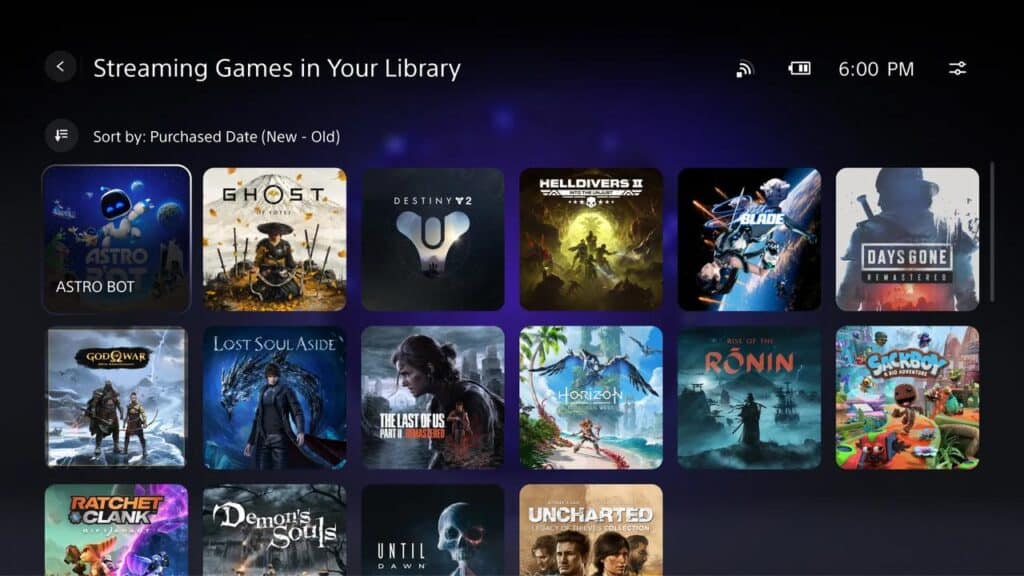
The catalog includes major releases like Cyberpunk 2077, God of War Ragnarök, Ghost of Tsushima, and Hogwarts Legacy. Each one can be launched directly on the Portal with just a few taps.
The best part is convenience. No downloads, no waiting, and no storage limits. Your save data is stored in the cloud, so you can pick up where you left off, whether you’re on the PlayStation Portal or another device that supports PlayStation Plus Premium.
Requirements for Cloud Gaming on the PlayStation Portal
Before you can start cloud gaming on PlayStation Portal, there are a few things you’ll need to have set up. Thankfully, it’s simple and doesn’t require owning a PS5 console.
Here’s what you need:
- A PlayStation Portal Remote Player. You’ll use the handheld to connect directly to PlayStation’s cloud servers.
- An adult PlayStation account. Cloud gaming on the PlayStation Portal isn’t available for child accounts.
- An active PlayStation Plus Premium membership. This is required to access cloud gaming. It gives you access to select PS5 titles from your digital library, as well as games in the PlayStation Plus Game Catalog and Classics Catalog.
- Live in a supported PlayStation Cloud Gaming region. Cloud gaming is currently available in: Canada, United States, Japan, Austria, Belgium, Bulgaria, Croatia, Czech Republic, Denmark, Finland, France, Germany, Greece, Hungary, Ireland, Italy, Luxembourg, Malta, Netherlands, Norway, Poland, Portugal, Republic of Cyprus, Romania, Slovakia, Slovenia, Spain, Sweden, Switzerland, and the United Kingdom.
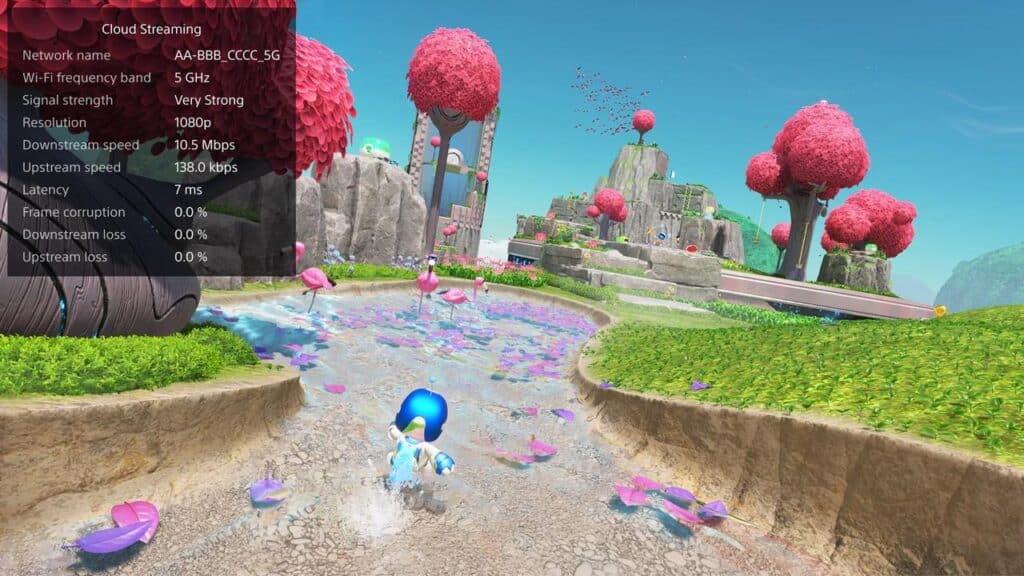
- A broadband internet connection. Minimum: 5 Mbps upload and download speeds. Recommended for 720p: 7 Mbps. Recommended for 1080p: 13 Mbps.
Performance may vary depending on your network stability. The higher your connection speed, the smoother your gameplay and video quality will be.
How to Start Cloud Gaming on PlayStation Portal
Once you have everything set up, getting started with cloud gaming on PlayStation Portal is straightforward. You can be playing PS5 games in just a few minutes.
To start cloud gaming:
- Turn on your PlayStation Portal and connect to Wi-Fi.
- From the home screen, select the Cloud Streaming tab in the top left corner.
- Choose a game from one of the available options:
a) Cloud Streaming with PlayStation Plus Premium
b) Streaming Games in PlayStation Plus
c) An eligible game from Your Library - Select Stream to launch the game instantly.
Your game will start once connected, with no downloads or installs needed.
You can adjust the maximum resolution during a session by opening the quick menu and selecting Max Resolution:
- 1080p if your internet is stable and above 13 Mbps
- 720p if you want to prioritize connection stability at 7 Mbps or higher
To close a session, open the quick menu again and choose Close Game. Your progress saves automatically to the cloud, allowing you to pick up right where you left off later.
If you want to see which titles are currently supported, use the Search tab on your PlayStation Portal or you can see all the PS5 games you can stream right now on the PlayStation Portal with PlayStation Plus Premium here.
Cloud Gaming Limitations and Settings on PlayStation Portal
Cloud gaming on PlayStation Portal is convenient, but there are a few limits to keep in mind. These help set expectations and ensure the best possible experience.
Current limitations:
- Only select PS5 games are available to stream. You can’t stream PS4 or PS3 titles at this time.
- Performance varies by game and connection quality. Visuals and responsiveness depend on your internet stability.
- Inactive sessions automatically close after a period of inactivity, so always save your progress.
- Cloud gaming is only available for adult accounts with an active PlayStation Plus Premium membership.
Accessibility and interface options:
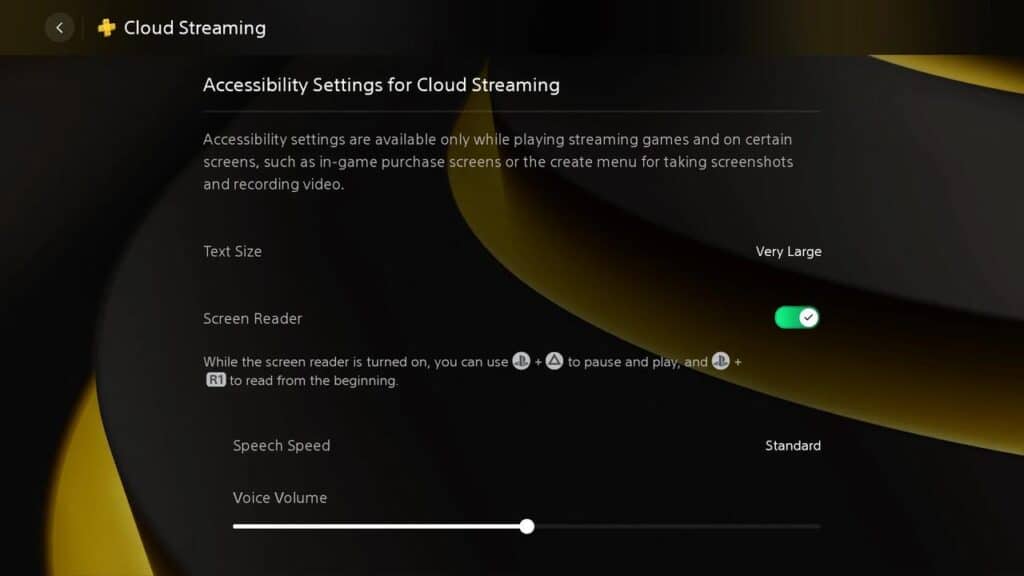
You can fine-tune your cloud gaming experience from the quick menu.
- While streaming, open the quick menu.
- Select Cloud Streaming > Accessibility Settings for Cloud Streaming.
- Here, you can adjust text size and enable screen reader support for certain screens.
These settings make it easier to read menus and follow dialogue during streaming sessions.
Why Use Cloud Gaming on PlayStation Portal
Cloud gaming on PlayStation Portal makes it easier than ever to enjoy your PS5 games without being tied to your console. You can jump into action-packed adventures, explore large open worlds, or relax with slower-paced games anywhere you have a good connection.
One of the biggest advantages is convenience. You don’t need to wait for downloads or manage your console’s storage space. You also don’t even need to own a PS5 console to stream games—just a PlayStation Plus Premium membership. That means you can stream supported digital games from your library or try titles from the PS Plus Game Catalog instantly.
It’s also great for flexibility. Maybe someone else is using the TV or your console is off. You can still launch games like God of War Ragnarök, Hogwarts Legacy, or Ghost of Tsushima directly from your Portal and continue right where you left off.
If you want to learn more about supported games, settings, or the latest update, check out our related articles:

- PlayStation Portal Cloud Streaming Launches with Select PS5 Library Support and Major Feature Upgrades
- PlayStation Portal: Best PS5 Games to Play with Cloud Gaming Right Now
- A list of all the PS5 games you can stream right now on the PlayStation Portal with PlayStation Plus Premium
Frequently Asked Questions About the PlayStation Portal and Cloud Gaming
We’ve covered a lot in this beginner’s guide, but a few common questions still come up from new users. Cloud gaming on PlayStation Portal is simple once you’ve tried it, so here are quick answers to help clear things up before you dive in.
1. Can multiple users stream with the same PlayStation Plus Premium account?
Only one person can use a PlayStation Plus Premium account for cloud streaming at a time. If you share games or subscriptions through account sharing, only the signed-in account can stream. The second person will need their own Premium membership to stream separately.
2. Can I use cloud gaming on PlayStation Portal outside my home network?
Yes. Cloud gaming works anywhere with a stable connection and in a supported region. It doesn’t rely on your PS5 console or home Wi-Fi, so you can play even if your console is off or someone else is using it.
Your Starting Point for Cloud Gaming on PlayStation Portal
Cloud gaming on PlayStation Portal is still evolving, but it’s already one of the easiest ways to enjoy your PS5 games anywhere. Whether you’re experimenting for the first time or using it daily, it’s a clear step toward a more flexible PlayStation future.
If you’re new to cloud gaming, this guide is designed to help you get comfortable fast. From setup to streaming, everything’s covered. As more updates roll out, this will remain a handy reference for anyone exploring cloud gaming on PlayStation Portal.
As always, remember to follow us on our social media platforms (e.g., Threads, X (Twitter), Bluesky, YouTube, and Facebook) to stay up-to-date with the latest news. This website contains affiliate links. We may receive a commission when you click on these links and make a purchase, at no extra cost to you. We are an independent site, and the opinions expressed here are our own.