


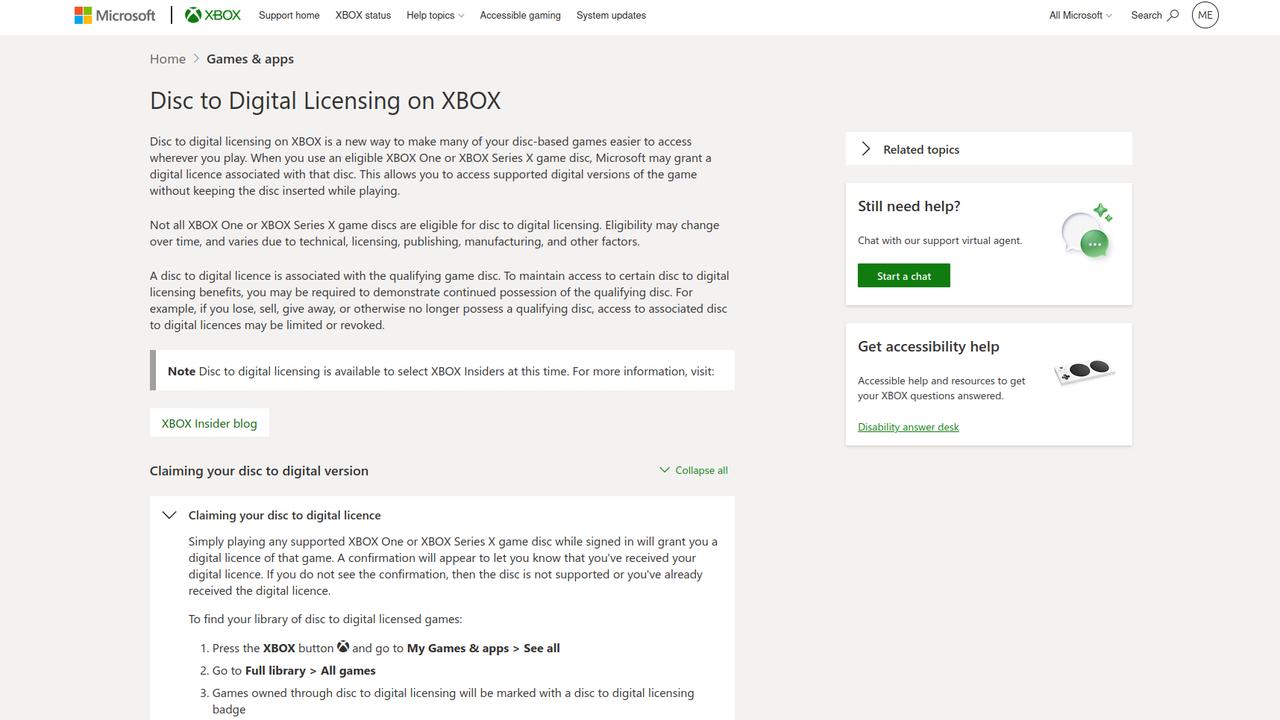
XBOX Disc-to-Digital is now live for select XBOX Insiders, and we now know a lot more about how the licensing system works. Supported XBOX One and XBOX Series X discs can now grant a digital licence. Microsoft has also explained what can happen if that disc later leaves your possession.
Once the licence is claimed, the disc doesn’t need to stay in the console while you play. You can eject it and keep using the supported digital version, while the physical copy continues to work normally.
The important part is that removing the disc from the console doesn’t remove it from the licensing relationship. Microsoft says you may need to prove you still possess the qualifying disc. If you sell it, lose it, or give it away, access to the digital licence may be limited or revoked.
The Disc Doesn’t Need to Stay Inserted
Claiming the digital licence is straightforward. If you’re signed in and launch a supported XBOX One or XBOX Series X game from disc, a confirmation appears when the licence has been granted. XBOX also marks these games with a dedicated disc-to-digital licensing badge in your library.
For anyone with a larger physical collection, there’s a quicker way to work through it. After turning off automatic disc playback, you can insert a game and choose Get digital licence followed by Claim. Once the confirmation appears, eject the disc and move on to the next one.
Not every physical copy will qualify. Eligibility can depend on licensing and publishing restrictions, manufacturing differences, technical limitations, and other factors. A damaged disc can also cause problems. A delisted digital version or non-participating game can prevent a licence from being granted too.
Losing or Selling the Disc Can Affect Digital Access
The digital licence stays associated with the qualifying physical disc. You can play without leaving that disc in the console, but Microsoft may still require you to prove that you have it.
If the disc leaves your possession because you sell it, lose it, or give it away, Microsoft may limit or revoke access to the associated digital licence. XBOX also includes a settings area where you can see disc-to-digital games you no longer have access to.
Getting access back is fairly simple if you still have the disc. Reinsert it and go through the claiming process again. If you no longer possess the disc, Microsoft says the other option is buying the game digitally from the Microsoft Store.
One question is still unanswered. Microsoft hasn’t explained how XBOX distinguishes one physical disc from another.
XBOX Play Anywhere Extends Some Licences to PC and Handhelds
For games that support XBOX Play Anywhere, disc-to-digital licensing can extend beyond the console. After you claim an eligible licence, the supported game appears in My Library in the XBOX app. You can then install and play it on PC and supported handhelds.
There are some important limits. Original XBOX and XBOX 360 discs aren’t supported, and not every XBOX One or XBOX Series X disc qualifies. For multi-disc games, Microsoft says disc one must be used to claim the digital licence.
Edition content also depends on how it was delivered. Content installed directly from the qualifying disc may be included with the digital licence. DLC, promotional items, and other extras supplied through separate redemption codes may not be included.
For now, the test is limited to select XBOX Insiders. If you’ve got a larger physical XBOX collection and you’re included, the manual claim option lets you work through it one disc at a time and see what qualifies. Microsoft says eligibility can change over time.
As always, remember to follow us on our social media platforms (e.g., Threads, X (Twitter), Bluesky, YouTube, and Facebook) to stay up-to-date with the latest news. This website contains affiliate links. We may receive a commission when you click on these links and make a purchase, at no extra cost to you. We are an independent site, and the opinions expressed here are our own.