


Amazon has quietly updated Amazon Luna, its cloud gaming service, renaming Luna Couch as Remote Play and giving it a new dedicated section in the interface. The live Amazon Luna interface now gives Remote Play its own tab marked “NEW,” where hosts can generate a code, invite friends, and start a compatible multiplayer game.
That doesn’t mean Amazon built a completely new multiplayer feature. Luna Couch already let people share local co-op and multiplayer games remotely without requiring every guest to have an Amazon Luna subscription. Remote Play builds on that idea with a dedicated invite flow, a pre-game lobby, and more host controls.
Amazon hasn’t announced the change or provided a rollout date. Community reports suggest the transition happened around August 20 or 21, with one Amazon Luna user reporting that Luna Couch was still available on August 19 before Remote Play appeared.
Remote Play Keeps the Luna Couch Foundation
Amazon first introduced Luna Couch on September 9, 2021, while Amazon Luna was still in early access. The idea was straightforward. One person could launch a local multiplayer game, create a code, and invite others to join remotely. Guests didn’t need their own Amazon Luna subscription, making it an easy way to bring online friends into local multiplayer games.
Remote Play keeps that same foundation, letting friends in different locations join multiplayer, co-op, and shared-screen games. The host still shares a code, and invited guests still don’t need an Amazon Luna subscription to join.
That overlap is why Remote Play is better understood as the next version of Luna Couch than a completely separate feature. The name and interface have changed, but the main purpose is still remote access to local multiplayer games.
Remote Play Adds a Lobby and More Host Control
The most visible change is the new flow inside Amazon Luna. Remote Play has its own tab and a dedicated lobby before a game begins. You generate a code, share it with your friends, and wait for someone to join before starting a compatible game.
After generating a code, the live Amazon Luna interface opens a separate Invite friends screen. It shows a six-digit code and a QR code for sharing join instructions. Guests enter the code from the Remote Play page in Amazon Luna.
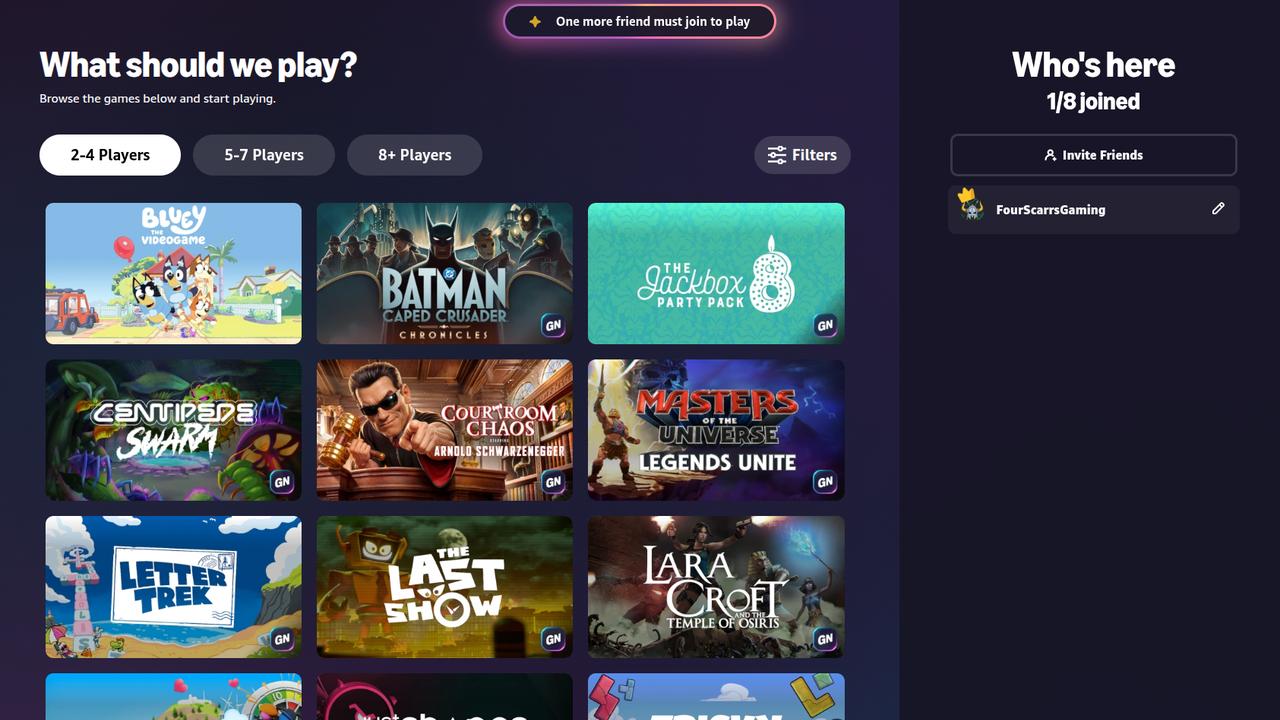
Amazon’s support pages say Remote Play supports up to seven guests. Prime and Luna Premium customers can host. Guests need an Amazon account, a supported device, a compatible controller or phone controller, and a minimum internet speed of 10 Mbps.
Amazon also says Remote Play itself isn’t supported on mobile devices. Hosts can remove someone from the current lobby or block them from rejoining. Invited guests can watch or join gameplay, while voice chat isn’t currently available in Amazon Luna.
For anyone who used Luna Couch, Remote Play should feel familiar despite the NEW badge. The core idea is still there, but Remote Play gives it a clearer home in Amazon Luna and a more structured way to get everyone into the same game.
As always, remember to follow us on our social media platforms (e.g., Threads, X (Twitter), Bluesky, YouTube, and Facebook) to stay up-to-date with the latest news. This website contains affiliate links. We may receive a commission when you click on these links and make a purchase, at no extra cost to you. We are an independent site, and the opinions expressed here are our own.