An Amazon Luna user on Reddit found that the app appears to track more stream stats than the public Fire TV overlay currently shows. The current overlay already lets Fire TV users check bandwidth, FPS, skipped video frames, resolution, and audio channels during play.
That’s a decent quick check, but the Luna app seems to have more going on. The user says 15 additional debugging metrics can be surfaced by recompiling the app, and they’re asking Amazon Luna to make a few of them public, including Decode Latency, Packets Lost, and Media Codec name.

Amazon Luna Tracks More Stream Metrics Inside The App
These extra metrics aren’t sitting inside a normal settings menu. That’s important to keep clear. Still, it’s an interesting find because the app appears to track more performance data than the Fire TV overlay actually shows.
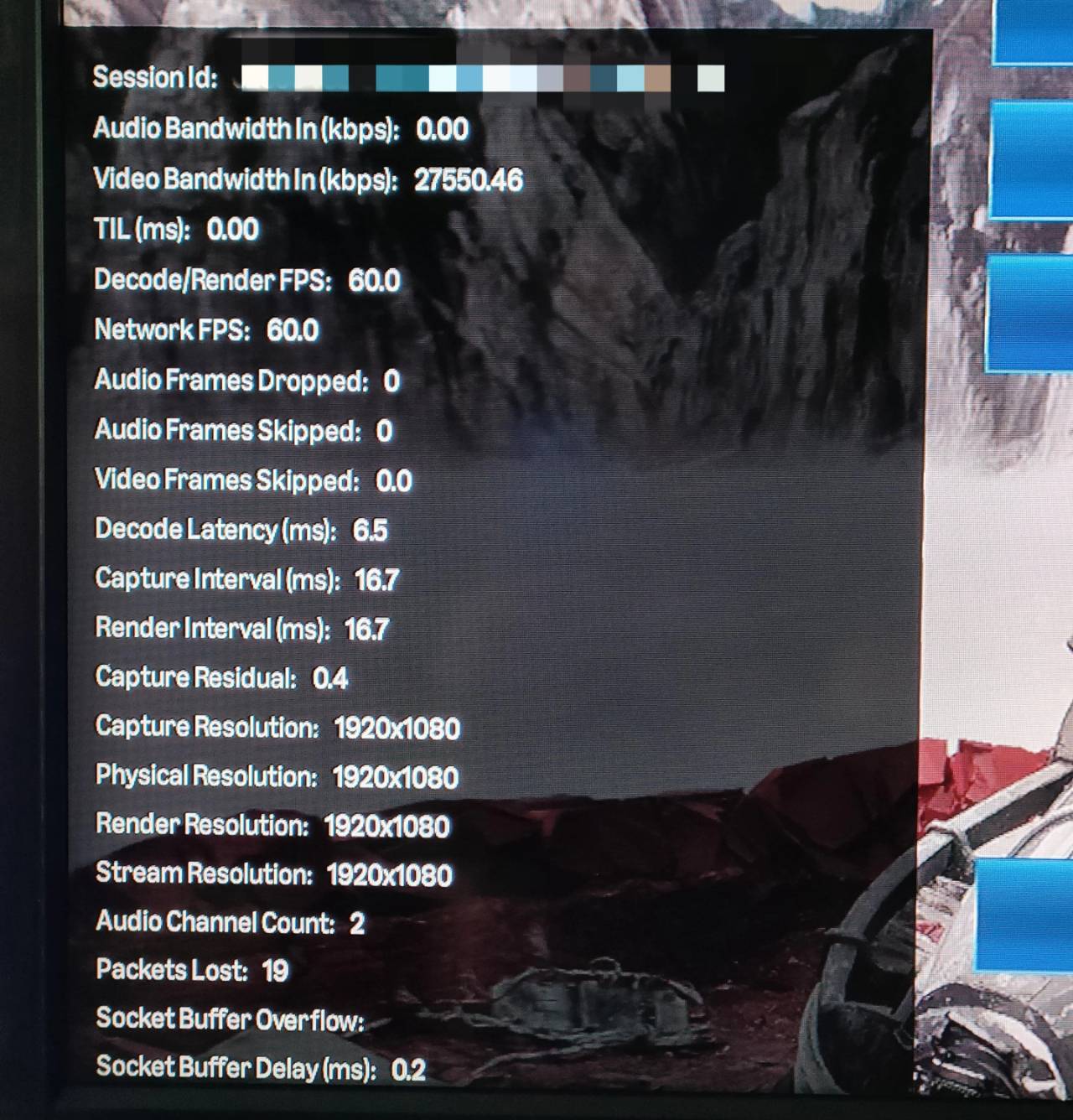
That extra context would be handy when cloud gaming performance doesn’t line up with what the basic overlay is telling you. The current stats are fine for a quick glance, but they don’t always explain the problem. A stream can look fine on the surface and still run into decoding trouble, packet loss, or device-specific issues.
The requested additions would make those checks more useful. Decode Latency would show how long the device takes to process the incoming stream. Packets Lost would point toward network trouble. Media Codec name would show which decoder the stream uses, which would help when comparing Fire TV hardware, Android TV devices, and other TV setups.
Better Stream Stats Would Make Luna Easier To Troubleshoot
Most Amazon Luna users probably won’t need this much information during regular play. If the game starts quickly and the controls respond properly, the current overlay is probably enough.
The extra stats become more interesting when something goes wrong. If input lag is worse on one device than another, the codec and decode latency could help explain whether the device is part of the issue. If the stream stutters even when bandwidth looks fine, packet loss could point toward the network instead.
The Reddit post also points to a smaller Android TV problem. When Amazon Luna is sideloaded on Android TV devices, many remotes don’t have a Menu button, which makes opening the current stats overlay awkward. The user mentions a command-line workaround, but that isn’t exactly couch-friendly.
Amazon hasn’t announced any change to the public Amazon Luna stats overlay. For now, this is just a smart community request. Adding a few more public stream stats would improve the app without turning it into a full technical dashboard.
As always, remember to follow us on our social media platforms (e.g., Threads, X (Twitter), Bluesky, YouTube, and Facebook) to stay up-to-date with the latest news. This website contains affiliate links. We may receive a commission when you click on these links and make a purchase, at no extra cost to you. We are an independent site, and the opinions expressed here are our own.